Docs / AMS / Share and change / Change something that's already live
View as MarkdownChange something that's already live
Change an agent colleagues already use, know who is affected and when, and roll back if it goes wrong.
After this page, you can change an agent people depend on, know exactly when each change reaches them, and get back to the last good version if it goes wrong.
The invoice exceptions agent has run for a month. Finance now wants supplier queries to quote the contract clause. That's a change to something people rely on, so you need three answers: what happens when you save, who is affected and when, and how you undo it.
What keeps a history
| What | Keeps versions? | How you undo a change |
|---|---|---|
| The agent's configuration: prompt, model, resources, script, schedule, name | Yes, as agent versions | Activate an earlier version |
| Functions | Yes | Roll back to this on an earlier version |
| Widgets | Yes | Re-activate an earlier version |
| The agent's description and availability | No | Change it back and save |
| Connections, and the operations on them | No | Change it back |
Two rows trip people up.
- A script has no history of its own. The agent's version records which script version it uses. To roll back a script change, activate the agent version from before it.
- Connections have no history. Withdrawing approval for an operation takes effect on the next call, everywhere. That makes it the emergency lever, and the only undo is to approve it again.
What happens when you change each thing
| What you change | When it takes effect | Who is affected |
|---|---|---|
| Prompt, model, resources, script or name | When you save it as a version and make that version active | Everyone, from their next turn. A script run already under way finishes on its old script version |
| Creating or deleting a schedule | Immediately on save | The schedule |
| Availability (the Available switch and Where this agent can be used) | Immediately on save | Everyone |
| A function | When you publish the new version | Every agent that calls it, on its next call |
| A widget | When you publish the new version | Every agent that shows it, on its next turn |
| Approving, withdrawing or disabling an operation | Immediately | Every agent, on its next call, including conversations already running |
| A connection's login details | Immediately | Everything that uses the connection |
The pattern: changes on the connection reach everything at once. Changes to the agent wait until you activate a version, then reach people on their next turn. If you need access stopped this minute, go to the connection.
A function is shared. Publishing a new version of the invoice-comparison function changes behavior for every agent that calls it, not only the one you had in mind. Before you publish, check which agents hold it on Govern → Monitor → Topology.
How to do it
- Make the change on the agent. Its tab gets a dot, and the top bar says Unsaved changes.
- Choose Save as version. This saves a new version and activates nothing. People still get the old one.
- Try it. Run it on invoices you know the right answer for, ideally in another environment first (see below).
- Make it active. Choose Make it active after saving, or open Versions & Availability, find the version, and choose Activate version N from its menu.
Activating checks that the version can run. It refuses a version whose resources no longer exist or whose model can't be served.
Roll back
On Versions & Availability, open the menu on the version you want and choose Activate version N. The dialog says what happens: conversations already in progress finish their current turn on the version they started, and use version N from their next turn. Nothing is deleted.
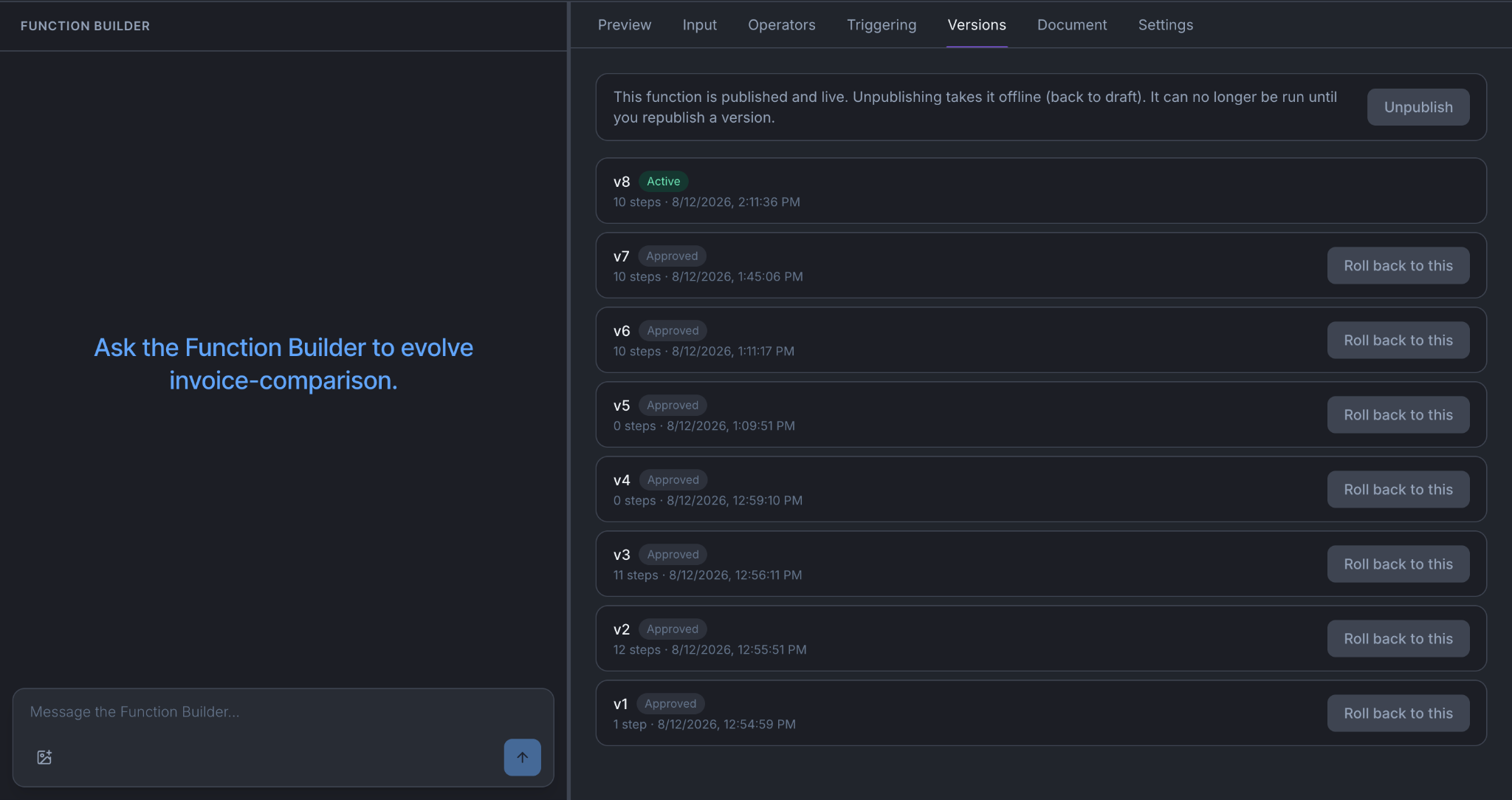
For a function, open its Versions tab and choose Roll back to this on an earlier published version. For a widget, choose Re-activate.
Try it somewhere that isn't live
An environment is a named partition inside your org, such as Sandbox, Test and Production. Every org starts with one, called Sandbox. Org admins create more in Settings → Environments, and can rename them. An environment can't be deleted.
Use a second environment for anything you wouldn't want a colleague to meet first:
- Switch to Test and make the change there.
- Point the finance connection at a sandbox copy if the change touches a write. Operations run for real when you try an agent, so a real connection means a real supplier query.
- Run it on invoices you know the answer for.
- Make the same change in Production once it holds up. Nothing copies between environments on its own.
Run the acceptance tests
Every change above can change how the agent behaves. Acceptance tests tell you whether it still does what it must.
- Open Govern → Optimize → Acceptance tests for the agent, and choose Run all.
- Read the failures first. A change that fixes one thing and breaks another is the normal way this goes wrong.
- Add a test for what you just changed, if none covers it. Dry-run it before you accept it, to check it means what you think.
Activating a version doesn't run the tests, and a failing test doesn't stop you activating. Run them before you choose Make it active, and treat a failure as a reason not to.
When it does not work
- You saved and nothing changed. You saved a version but didn't activate it. Check which version is active on Versions & Availability.
- A version won't activate. Something it names no longer exists, or its model can't be served. Read the reason, fix it in a new draft, and save a new version.
- Your change works and an accepted test now fails. Accepted tests can't be edited. Either the change is wrong, or the test describes behavior the business no longer wants. In that case, amend it (which retires the old test and accepts a replacement) or retire it with a reason.
You're done when
- You know which of your changes were instant and which waited for activation.
- You've activated an earlier version at least once, so you know where it is before you need it in a hurry.
- The acceptance tests pass on the version you activated.
- The people who use the agent know it changed.