Docs / AMS / Run it in your own cloud / Mindset in your own AWS account
View as MarkdownMindset in your own AWS account
Decide whether to run Mindset inside your own AWS account, and see what lands there, what you provide, and how upgrades work.
This page tells you what a self-hosted Mindset deployment in your own AWS account looks like, what you need to provide, and how it stays current. Most organizations use Mindset as a hosted service. Self-hosting is an option for teams whose data or contracts require it. If you are planning one, talk to us first and we will confirm the details for your account.
What this is
The whole product (AMS, the Hub, the agent runtime and the API) ships as one container image. You run it in your own AWS account from a CloudFormation template we give you. Your team performs every action inside the account. Nobody from Mindset needs standing access to it.
The template comes in two versions:
| Template | Use it when |
|---|---|
| Create VPC | You want the stack to build a new VPC, two public and two private subnets, an internet gateway and one NAT gateway |
| Adopt VPC | You already have a VPC, subnets and an internet gateway, and the stack should create nothing at the network layer |
Everything above the network layer is the same in both. You deploy either one with the AWS CLI. There is no CDK bootstrap and no Terraform state to host. If your team works in Terraform, you can wrap the stack in an aws_cloudformation_stack resource.
What lands in your account
| Resource | What it does |
|---|---|
| ECS Fargate service | Runs the container. There are no servers or clusters to patch |
| Application Load Balancer | Terminates TLS on your hostname. It is the only public component |
| Security groups | The tasks accept traffic only from the load balancer, and the databases only from the tasks |
| RDS PostgreSQL (platform) | Application data, with pgvector for knowledge search. Not publicly accessible |
| RDS PostgreSQL (audit) | A separate database for the audit record. Its writer role can insert and read, never update or delete |
| S3 bucket | Large conversation content and connection attachments. Public access is blocked |
| Secrets Manager | Model keys, connection credentials, database passwords and other secrets. The app can only touch secrets under its own prefixes |
| CloudWatch log group | Application logs, kept 30 days by default |
| IAM roles | One to start the tasks and one they run as |
| AWS Budgets budget | Emails you at 85% and 100% of a monthly figure you set. It is an alert, not a cap |
You also create two things yourself before you deploy:
- An ACM certificate for your hostname, issued in the same region. The stack uses it. It doesn't create it.
- An ECR repository that we push releases into (more on that below).
Things to know before a security review:
- There is no AWS WAF in the template. Add one in front of the load balancer if your policy requires it.
- Encryption at rest uses AWS-managed keys by default. You can pass your own KMS key for the databases. The S3 bucket uses S3-managed encryption.
- The databases are single-AZ by default. Backups are kept for seven days, deletion protection is on, and a final snapshot is taken if the stack is deleted.
- The load balancer is open to the internet by default. You can narrow it to a CIDR range or a prefix list.
What does not leave your account
There is no call-home, no license kill switch, and no Mindset control plane in the request path. The production image contains no code path that reports to Mindset. The deployment does reach outside your account, and every destination is one you choose:
- The model providers your org's model keys name: Anthropic, OpenAI, Google or AWS Bedrock.
- OpenAI, for knowledge-search embeddings. Embeddings always use OpenAI, so the private subnets need a route to the internet.
- Postmark, on your own server token, for invites and password reset emails.
- Google, only if you turn Google sign-in on.
- Your own OpenTelemetry endpoint, if an org sets one up.
- Whatever systems your connections point at.
Sign-in
People sign in with email and password or an emailed sign-in link. Google sign-in is optional and off by default. There is no SAML or OIDC federation with your own identity provider.
Regions
One deployment runs in one AWS region. When you install, you also set a Mindset region of eu or us. It is stamped on the deployment at first boot and can't be changed afterward.
The template grants the deployment access to two Bedrock models (Claude Sonnet and Claude Opus by default) through the EU inference profile. Check Bedrock model access and quota in your account before you install.
What we need from you
| You provide | Why |
|---|---|
| An AWS account and someone who can provision networking, databases and IAM | Your team runs every step. A dedicated account is cleanest, because the budget alert measures the whole account |
| An ECR repository and a push role | We push signed releases into it. The role trusts our release pipeline only, and can push and read but not delete |
| A hostname and access to your DNS | The certificate and the Google sign-in callback are tied to it, so decide it early |
| Model provider credentials | Keys for your chosen provider, plus an OpenAI key for embeddings. The providers bill you directly |
| A Postmark server token | Invites and password resets are sent by email |
| A named engineer for the setup window | One person with provisioning rights, reachable while the deployment is stood up |
How to do it
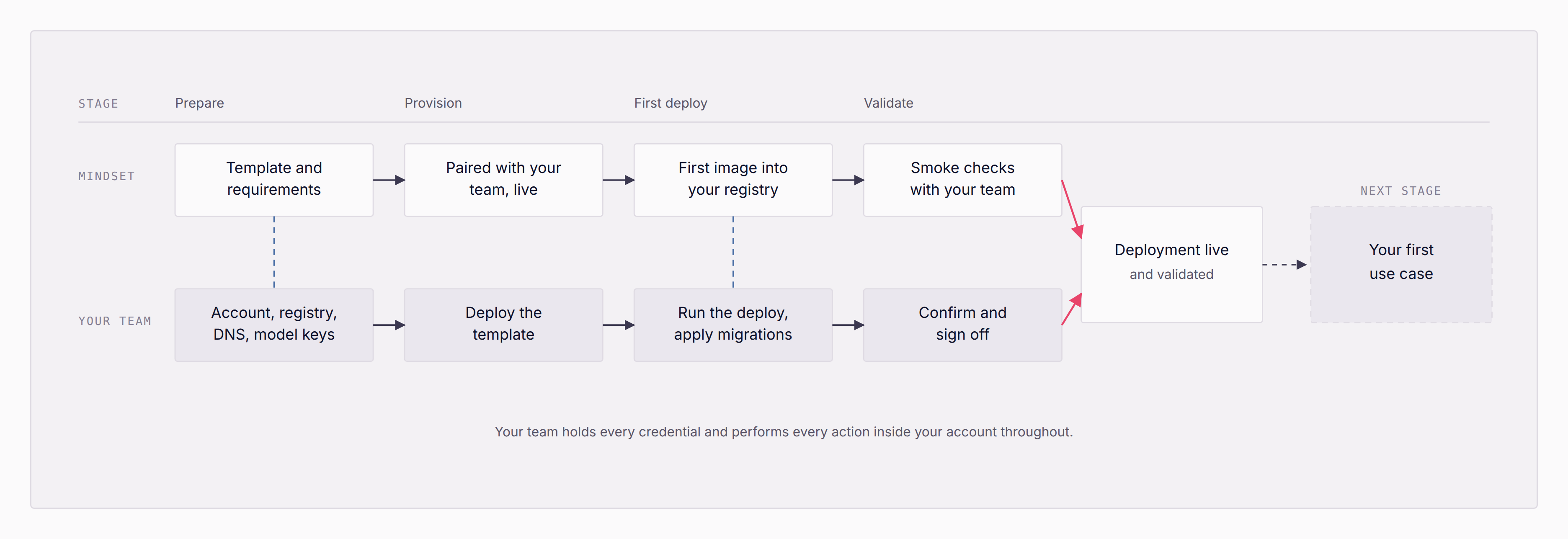
| Stage | Mindset | Your team |
|---|---|---|
| Prepare | Template pack and requirements | Account, registry, certificate, DNS, model keys |
| Provision | Alongside you in a shared channel | Deploy the stack and store the secrets |
| First deploy | Push the first release to your registry | Run the database steps and start the service |
| Validate | Smoke checks with you | Confirm and sign off |
Every step your team runs is a script in the pack. Each database step runs as a one-off ECS task inside your VPC, from the same image. After the smoke check, an operator signs in, creates the first org and adds a model key. Then the work moves into AMS: building and testing your first agent.
How it stays current
We push each release into your ECR repository. You decide when to apply it. Nothing upgrades itself.
A release arrives as four tagged items: the image, a signed release manifest, a signed software bill of materials and release notes. Each release has its own template pack, and the template and image are versioned together. The task definition pins the image by digest.
You can upgrade from any release we have shipped to the latest one in a single pass. The upgrade is a fixed sequence of scripts: read the release, plan the migration, snapshot both databases, migrate, deploy the stack, smoke check, backfill, smoke check again.
What can go wrong
- Rolling back means restoring the databases. Deploying an older image does not undo a migration. If you have to go back after the migration step, you restore both databases from the snapshots the upgrade took, then redeploy the old release. There is no script for the restore yet, so do it with your Mindset contact.
- An old release is gone from your registry. Rollback refuses to start. Our push role can't delete images, so this only happens if someone on your side removed it.
- Uptime is yours. The infrastructure runs in your account, so its availability is in your hands.
- We can't see your deployment. Nothing reports to us, so when we help diagnose a problem, we ask you for logs.