Docs / AMS / Build / Write a script
View as MarkdownWrite a script
Add a script to an agent for the part of its work that must wait or must happen in order, and choose how each phase is checked.
After this page you can give an agent a script for the stretch of its work that has to happen in order, and decide how Mindset checks each step before the agent moves on.
What this is
A script is an ordered set of phases. Each phase says:
- What runs on entry: a message, cards, suggested replies or a widget.
- What the agent is told while it's in this phase.
- What it can use here: which functions, operations and other agents.
- What it must collect before it can move on.
- The gate: the condition that moves it to the next phase.
The agent works out how to meet each gate on its own. It can't decide it has finished. Mindset checks the gate and moves it on, or tells it what is still missing.
When you need one
Most agents need no script. The agent's prompt carries what it is, what it knows and how it behaves. Add a script only for an instruction the agent must not be able to skip:
- It must wait for an answer from a person.
- It must not move on until something is true.
- It must not reach a tool before an earlier step is done.
A phase boundary is a place where the conversation must wait. "Collect the supplier's name, the invoice number and the amount" is one phase with three values to collect, because nothing waits between them. "Confirm the total before you continue" is a boundary.
The script covers only that stretch. Everything else stays in the prompt. A phase that exists only to say something the agent could have said on its own shouldn't be a phase.
What you get from a script
The agent can't skip ahead. The invoice agent can't register a supplier query before it has the purchase order, because the gate before won't let it through.
It can't use the wrong tool early. When a phase lists its resources, the agent is offered only those in that phase. The phase that gathers information doesn't hold the write, so the agent can't call it early.
You can see where it went wrong. An agent that keeps stopping at the same phase is telling you something about that phase.
What a script is not
Not the prompt. The prompt applies all the time. A phase's instructions apply only while the agent is in it.
Not a list of steps you draw. You write what each phase must achieve, and the agent finds its own way there.
Not a loop. A script can't repeat an action once per item in a list. That belongs in a function, which can run a step over up to 1,000 items.
The invoice exceptions script
| Phase | It must collect | It can use | How it advances |
|---|---|---|---|
| 1. Gather | The invoice, its purchase order, and the comparison of the two | The finance system reads, and the invoice comparison function | A check: all three are collected. If the comparison found no differences, skip to Close. Otherwise go to Assess |
| 2. Assess | Whether the contract allows the difference, and which clause says so | The supplier contracts knowledge base | A judgment: the answer names a specific clause |
| 3. Prepare | A supplier query, registered | The finance system write, register_supplier_query | A check: the query is registered |
| 4. Close | Nothing | Nothing | Ends here |
Three things to notice:
- Only Prepare holds the write. Gather and Assess can't change anything in the finance system.
- Gather uses a function for the comparison, because comparing an invoice to a purchase order is arithmetic and should come out the same every time.
- Assess is the only phase judged by a model, because "does this cite a specific clause" is something you'd have to read to decide.
The two kinds of gate
A check tests what was collected. Were both documents fetched? Does the comparison exist? It's instant, it costs nothing, and the agent can't argue its way past it.
A judgment asks a model to read the work and decide. Use one only when the condition is about quality, something you'd have to read yourself to assess.
Judgments are strict. Only a clear yes passes. Anything unclear, or any answer in the wrong shape, fails. The verdict and the reason for it are recorded with the run whether it passed or failed, so you can see why later. When a gate combines checks and a judgment, the model only judges after the checks pass.
When a gate fails, the agent is told what is still missing and keeps working in the same phase.
Use a check wherever the answer is yes or no.
Phases only go forward
Every route points to a later phase. You can't route back to an earlier one, and Mindset refuses to save a script that tries.
To branch, skip forward. A phase can have several routes. They're checked in order and the first one whose condition holds wins. In the example, Gather skips straight to Close when there is nothing to query.
A phase that needs several attempts stays where it is and keeps working until its gate passes. That's a retry inside the phase, not a route.
Asking a person in the middle of a run
If finance wants to approve each supplier query before it is registered, add a phase before Prepare that asks in Slack. The phase posts a message with buttons, and the run parks until someone answers. A phase can also set a time limit and move on when it runs out. See Making it run, and approving what it does.
This is the only way to put a person's yes in front of each individual call. An operation's own approval is given once, for the operation as a whole.
How to write one
- Write down the phases as outcomes. Not "search the contracts" but "we know whether the contract allows this difference, and which clause says so".
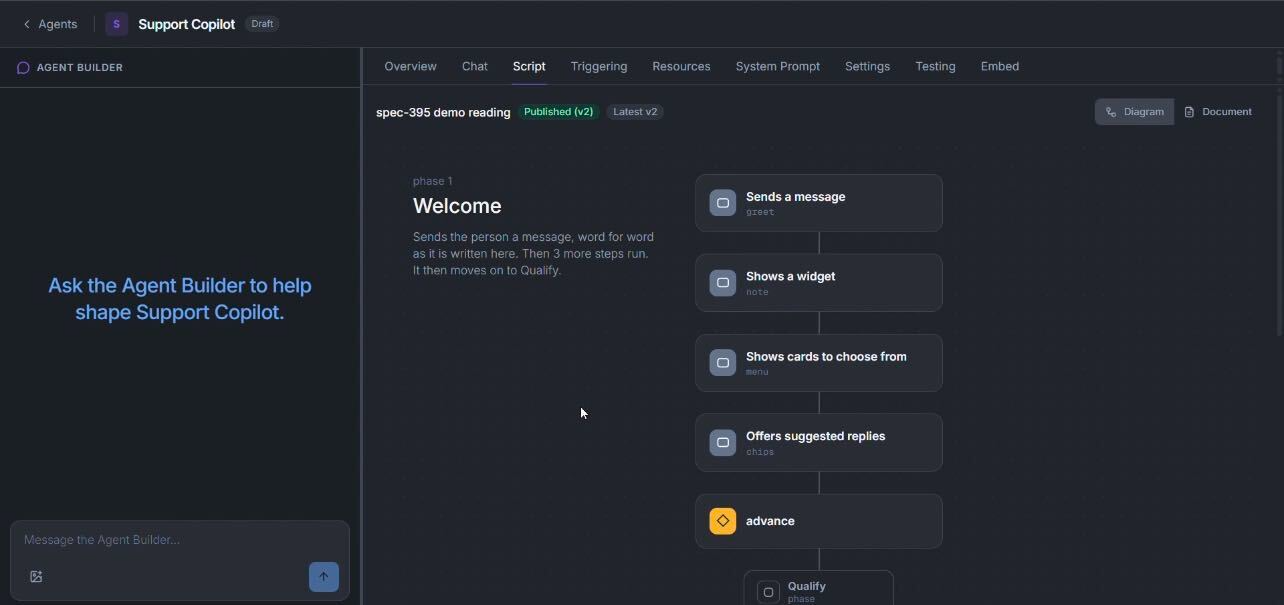
- Open the agent and go to the Script tab. If Orca built the agent, there may be a script already. Otherwise press Create script.
- Tell the Agent Builder what you want. It is docked on the left and hands script writing to the Script Builder.
- Read the result. Switch between Diagram and Document to see the phases, what each can use and how it advances.
- Give each phase the smallest set of resources it needs. A phase that lists no resources gets everything the agent has.
- Choose how each gate is checked. A check where the answer is yes or no. A judgment only where you'd have to read it.
- Press Save as version. The script is saved with the rest of the agent, as a new version. Nothing goes live yet.
- Try it on the Chat tab, which can talk to any saved version, and watch which phase it stops at.
- Activate the version on the Versions & Availability tab when you're happy. See What saving actually does.
To stop an agent running its script, use Detach script on the Script tab. The script isn't deleted, and you can attach it again.
You're done when
- Every phase marks a place where the agent has to wait or must not skip ahead.
- Every gate describes something you could check yourself.
- Every phase can use only what it needs.
- You can say, for each gate, why it's a check or a judgment.
- You watched a run on the Chat tab and saw where it advanced.